
Announcing ColdFront: A New User and Resource Management Platform#
Starting June 26, 2026, all Northwestern researchers will have access to a brand new platform called ColdFront. This platform allows researchers to request and manage resources on Quest. Quest users can easily see all of the resources they have access to and their upcoming expiration dates. It also allows PIs and managers of Quest resources to directly manage user access, request new resources, and renew resources.
ColdFront Streamlines Processes#
ColdFront puts Quest resource management tasks and information all in one place. Quest users will no longer need to navigate links to multiple forms or open help tickets with computing support for tasks such as removing users or changing resource managers. ColdFront functionality includes:
User management: PIs and ColdFront Project Managers can add other users to, and remove them from, their resources directly. Changes to user access will then take place on Quest within one day.
Resource information: Computing and storage resources are listed for each Project along with their expiration dates.
Resource requests: All computing and storage resource requests can be done from a “Request a Resource” button instead of navigating multiple forms.
Resource renewals: Resources are highlighted when it’s time to renew them; renewal requests are submitted directly in the platform.
Purchase history: An itemized purchase history is provided for all Priority Access resources, with expiration dates and details listed for each storage or node purchase.
What Is Changing?#
After ColdFront launches on June 26, all resource requests, renewals, and user management will happen through ColdFront. Allocation request and renewal forms will no longer be used.
ColdFront requires a few changes to the Quest allocation terminology and request process. The most significant changes are:
Users with access to a compute resource will automatically receive scratch space. No need to request scratch space separately.
Research II upgrade requests will be reviewed on a rolling basis instead of at quarterly deadlines.
Quest allocations will now be referred to as “Projects” in ColdFront. Project names can be edited to help you organize your resources and research.
General Access and Priority Access resources can exist under the same Project.
Allocation PIs become “Project Sponsors” and allocation managers become “Project Leads.” They can assign additional Project Managers to help administer resources and manage user access.
Project Sponsors, Project Leads, and Project Managers will add and remove users directly in ColdFront. Users must contact a Project Sponsor, Lead, or Manager to gain access to existing Quest resources.
Compute access and storage will be managed as separate resources.
All of your existing Quest resources and allocation information will be automatically imported into ColdFront Projects when the platform launches.
What Will ColdFront Look Like?#
The ColdFront platform will be accessed via a web browser. Access from off-campus must use the Northwestern VPN.
Landing Page#
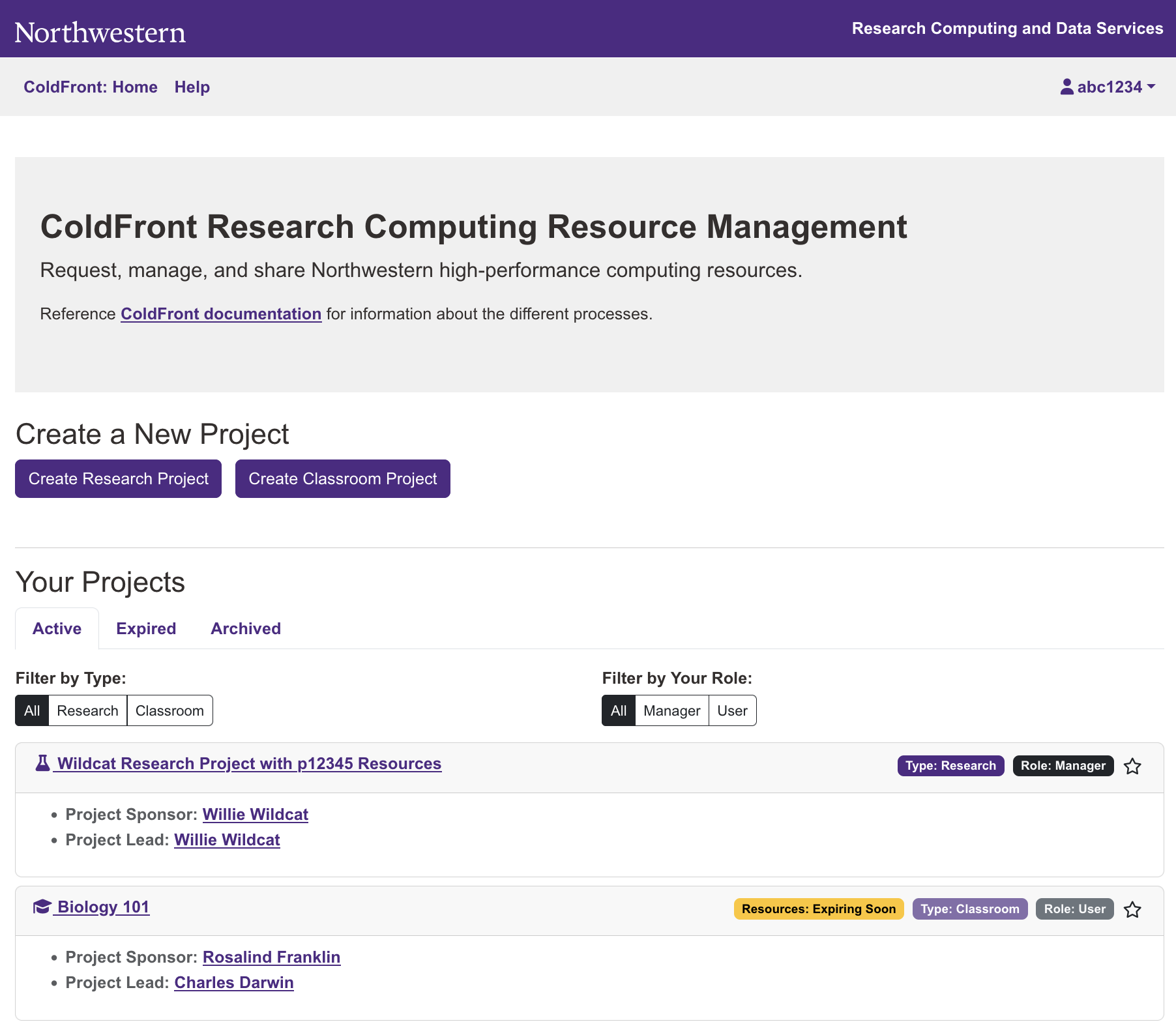
When you log in to ColdFront, you will see a landing page that lists all of the Projects you are a member of. The main page also gives you the option to create a new Project. “Project” is the new term for what was previously referred to as a Quest “allocation.” All existing Quest allocations have been mapped to new Projects in ColdFront. Your existing resources will remain the same and be accessible when ColdFront launches.
Project Page#
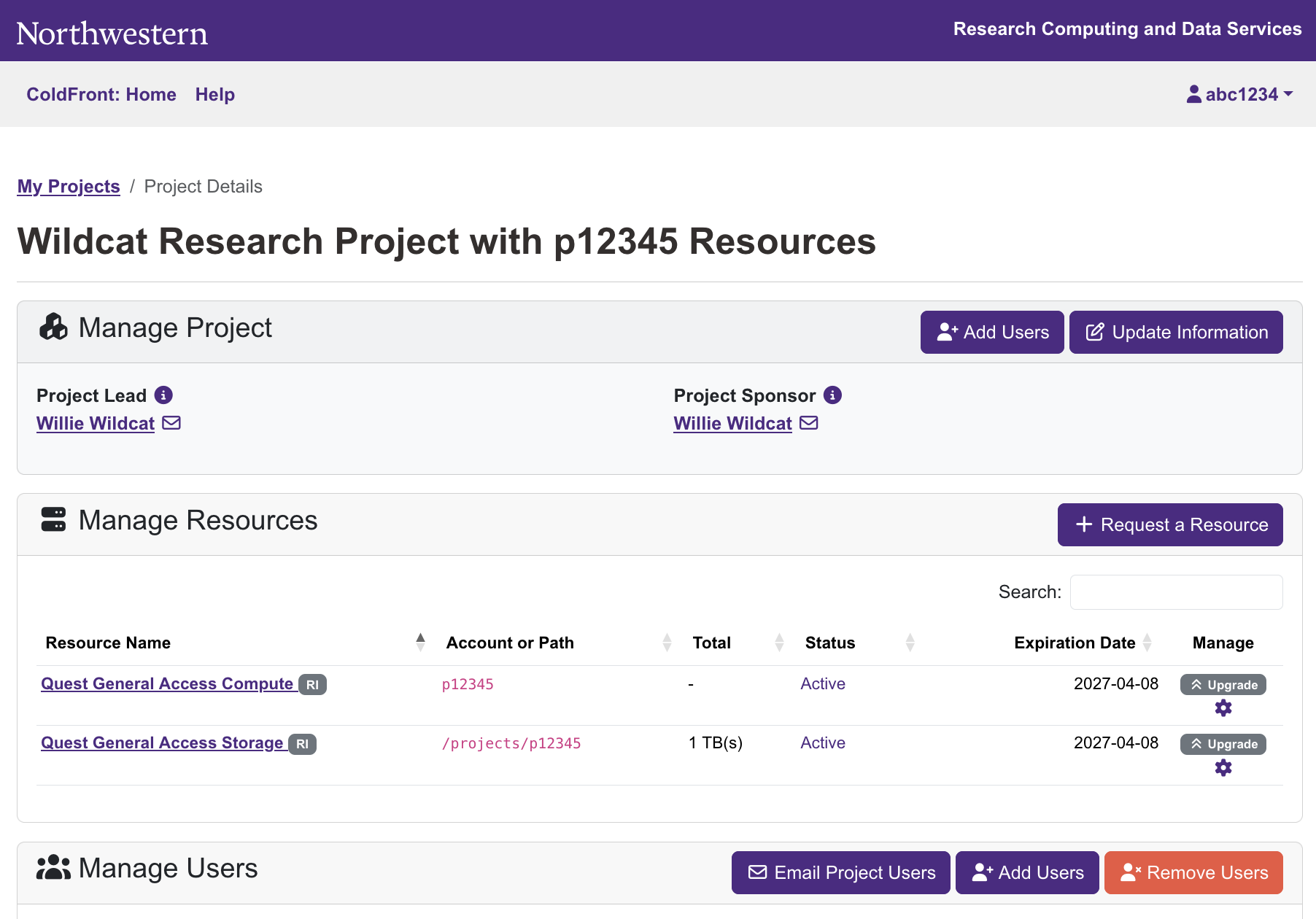
Clicking on the name of a Project on the landing page will take you to a project page that displays the details for that Project. If you are an administrative member of the Project, this page will allow you to make administrative changes for the Project such as adding and removing users, requesting new resources, upgrading or renewing resources, changing the name of the Project, and changing user roles for the Project.
If you are a non-administrative member of a Project, the Project page will display the names of the Project Sponsor, Lead, and any Managers, and list the resources available with their expiration dates.
Why Is It Called ColdFront?#
ColdFront was developed by the University at Buffalo Center for Computational Research. They named the platform ColdFront as a nod to Buffalo’s infamous weather. ColdFront is now used by many universities to manage access to HPC resources.
Learn More#
If you have any questions about these changes, please attend office hours with the Research Computing Support team either in Evanston or in Chicago , or consider scheduling a ColdFront Onboarding session for your lab group .